Skip to product information
1 of 2

Glizmos MetalForge™ Metallic Markers

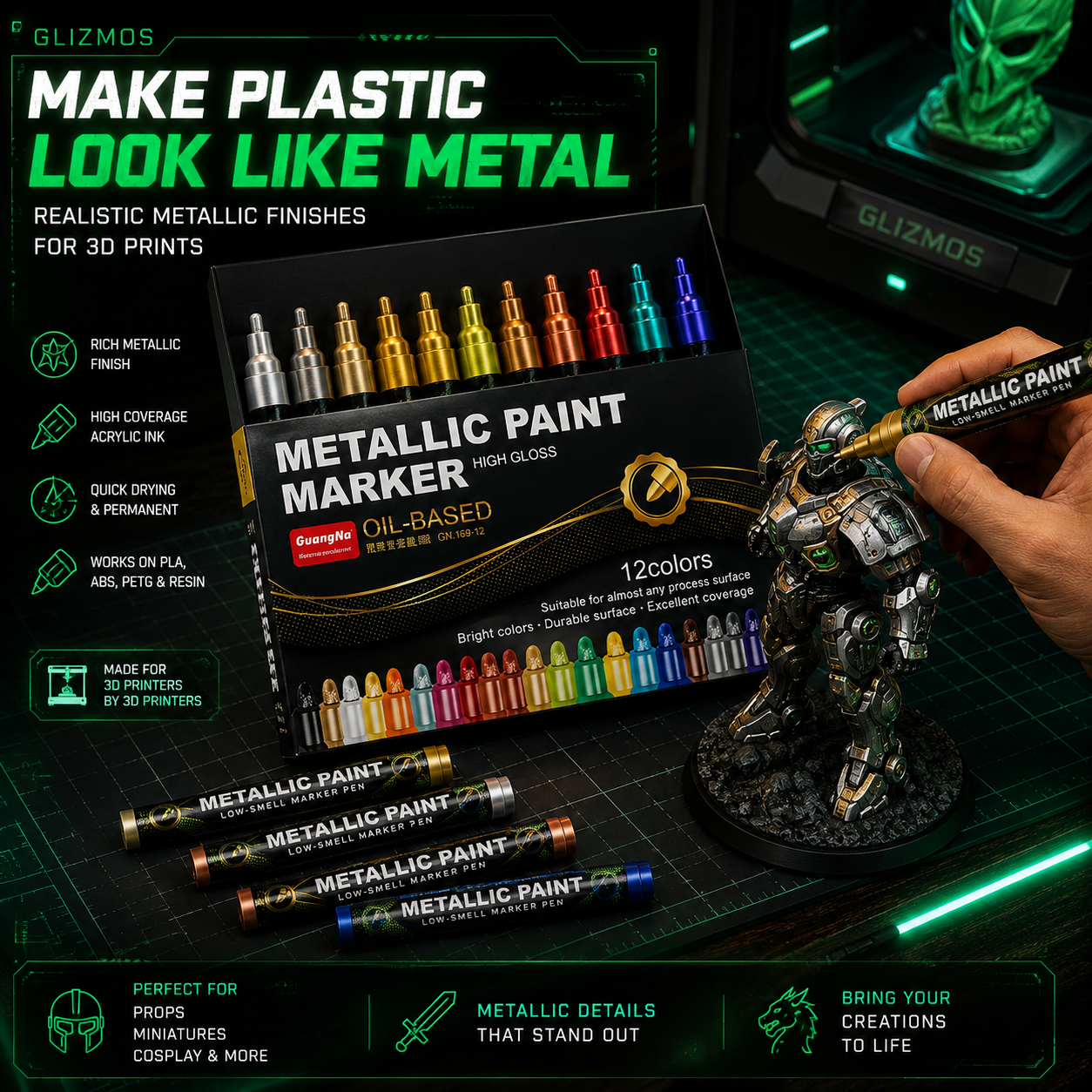
REAL METALLIC EFFECT Give plastic prints a convincing metal-like finish.
MADE FOR 3D PRINTS Ideal for miniatures, props, armor, weapons & models.
PRECISE DETAILING Add metallic edges, accents and highlights with control.
QUICK & EASY FINISHING Apply metallic color straight from the marker—no brush setup.
View full details
BUILT FOR 3D PRINT FINISHING

MAKE PLASTIC LOOK LIKE METAL.

Turn Ordinary 3D Prints Into Metallic Showpieces

Your print is finished. Now make it look finished.

Glizmos MetalForge™ Metallic Markers give you a fast, controlled way to add metallic accents, edge highlights, armor, weapons and mechanical details — without pulling out a full painting setup.

12 Metallic Colors
Precision Application
Made For Detail Work
GET METALFORGE™
METALLIC FINISH // LIVE
Glizmos MetalForge Metallic Markers being used on a 3D print
FROM PLASTIC TO METAL
THE DIFFERENCE IS IN THE FINISH

YOUR MODEL IS DETAILED. THE FINISH SHOULD BE TOO.

You can spend hours printing an incredible model, only for flat plastic surfaces to hide the details that make it special.

MetalForge™ gives you a simple way to bring those details forward with metallic color that adds contrast, depth, and a more premium finish.

01
Armor & Weapons

Bring blades, armor plates, shields and raised edges to life.

02
Mechanical Details

Highlight bolts, panels, machinery and small functional details.

03
Trim & Accents

Add metallic contrast to jewelry, trim, lettering and decorative areas.

FROM PRINTED TO DISPLAY-WORTHY
METALLIC DETAIL TRANSFORMATION
3D print transformed with Glizmos MetalForge metallic markers
METALFORGE™ IN ACTION
PRECISION METALLIC DETAIL
SEE IT IN ACTION

SEE WHAT METALLIC DETAIL CAN DO.

Precision where you want it. Metallic impact where it matters.

Apply metallic color directly to specific details without mixing paint, preparing brushes, or setting up an airbrush.

01 PICK A COLOR
02 ADD THE DETAIL
03 WATCH IT TRANSFORM
DIRECT-TO-DETAIL APPLICATION

Add metallic accents exactly where your model needs them.

BUILT FOR 3D PRINT FINISHING

BUILT FOR THE DETAILS THAT BRING PRINTS TO LIFE.

METALLIC FINISH

Create silver, gold, bronze, copper and colored metallic effects that make details stand apart from the base model.

PRECISION CONTROL

Reach edges, raised lettering, armor trim, weapons and smaller details without covering the entire model.

12 METALLIC COLORS

A versatile palette for everything from fantasy armor and props to futuristic machines and mechanical details.

NO BRUSH SETUP

No palette or brush cleanup. Grab a marker, choose your detail, and start adding metallic color.

SIMPLIFY YOUR FINISHING WORKFLOW

MORE PAINTING. LESS SETUP.

METALFORGE™
TRADITIONAL BRUSH
Ready Instantly
No Palette Needed
No Brush Cleaning
Precise Metallic Accents
Portable
Beginner Friendly
Metallic Colors
12 INCLUDED
DEPENDS ON YOUR PAINTS

Your 3D printer already did the hard part. Finishing shouldn't become another project.

COMPLETE YOUR 3D PRINT FINISHING WORKFLOW

BUILD YOUR COMPLETE FINISHING KIT.

Clean the print, add your main colors, then finish it with metallic detail. Three tools designed to work together from raw print to display-ready model.

Glizmos EdgeForge Deburring Tool PREP
01

Glizmos EdgeForge™

Clean rough edges, support marks and unwanted plastic before painting.

+
Glizmos Acrylic Paint Markers COLOR
02

Glizmos Acrylic Markers

Add the main colors to characters, clothing, props, environments and model details.

+
01 PRINT
02 CLEAN
03 COLOR
04 METALLIC DETAIL
05 DISPLAY

Choose the finishing setup that fits your projects.

CHOOSE YOUR BUNDLE
QUICK ANSWERS

METALFORGE™ FAQS

Can I use MetalForge™ directly on 3D prints?
Yes. MetalForge™ is designed for adding metallic details to 3D printed models. For the best finish, make sure the surface is clean before painting.
What can I use the metallic colors for?
They're ideal for armor, swords, shields, machinery, bolts, trim, jewelry, raised lettering, robots, props and other metallic details.
How many colors are included?
The MetalForge™ set includes 12 metallic colors, giving you a versatile range for different models and finishing styles.
Do I need brushes or an airbrush?
No. Simply choose your color and apply it directly with the marker. No paint palette, brush preparation, compressor or airbrush setup is required.
Are they good for small details?
Yes. MetalForge™ is especially useful for controlled metallic accents on edges, raised areas, weapons, trim and smaller model details.